7 Camera Placement Mistakes We Fix in Treasure Valley Businesses
· Erik Short
Quick answers
What's the most common security camera placement mistake? Pointing a camera at a glass entry door so every face walking in is backlit into a black silhouette.
How high should a camera be mounted for facial identification? Roughly 8 to 10 feet, high enough to be out of reach, low enough that you get a face instead of the top of a ball cap.
Do I need one camera per door? You need one camera that identifies people at each door people actually use, plus wider cameras for context, not a camera on every leaf of every opening.
Why don't my cameras show anything useful at night in the parking lot? Infrared has a real range limit and dies fast in open space; parking lots need light, not more megapixels.
How often should I check my recordings? Pull a random clip once a month. The day you need footage is a terrible day to discover the recorder filled up in March.
Most of the camera work we do in the Treasure Valley isn't new construction. It's walking into an office in Meridian or a warehouse off Franklin Road where somebody already installed cameras (sometimes a contractor, sometimes the owner's nephew, sometimes a national alarm company that dropped eight domes and left) and figuring out why the footage is useless.
The hardware is usually fine. Cameras have gotten cheap and good. The problem is almost always where they're pointed, how high they are, and what's behind the subject. Placement is the whole game. An inexpensive camera in the right spot beats a premium camera in the wrong one every single time, and I'll say that in front of anybody who sells cameras for a living.
Here are the seven mistakes we run into most, why they happen, what they cost you, and what we actually do about them.
1. The backlit entry: every face is a silhouette
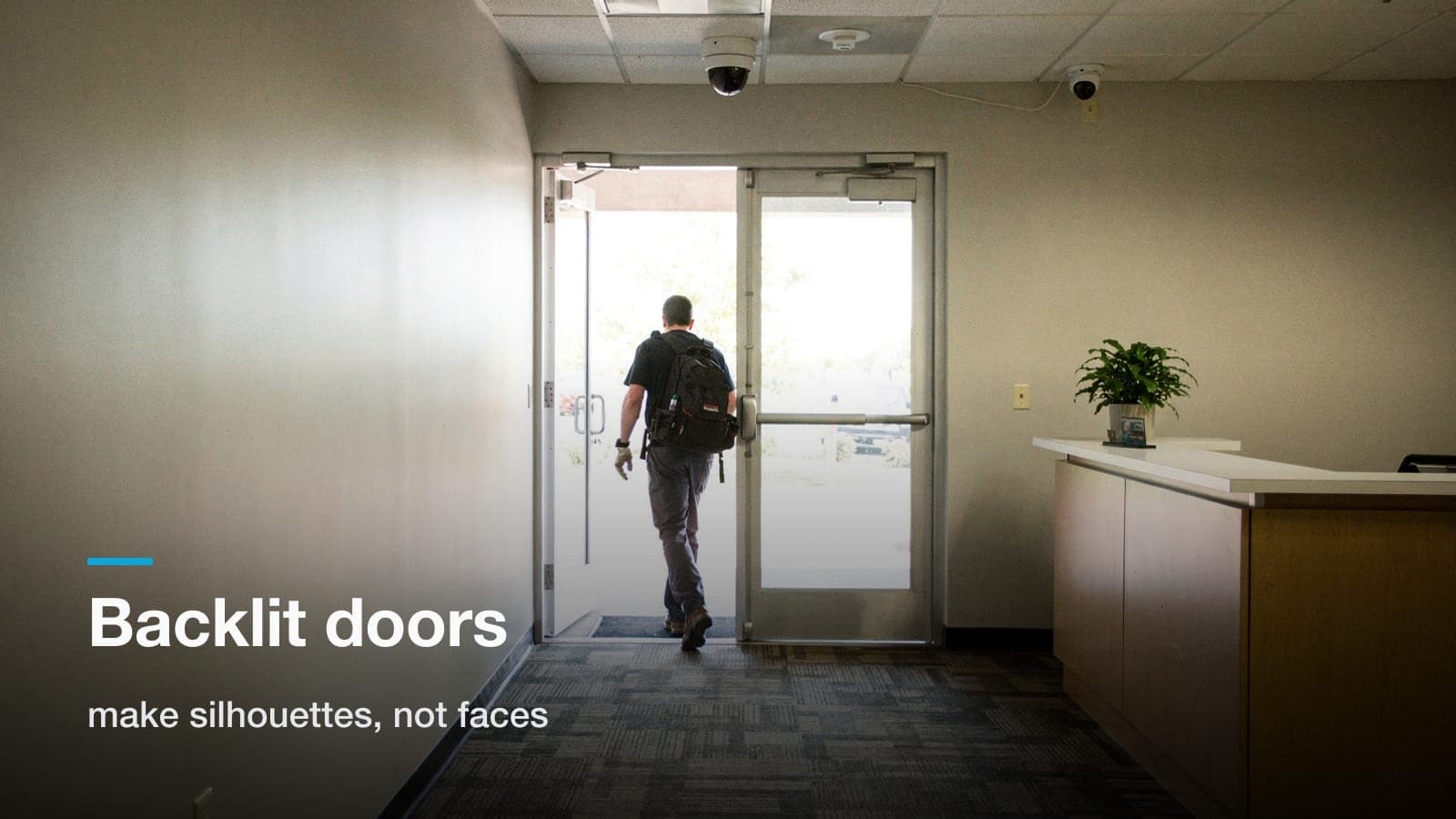
This is number one by a mile. Camera goes inside the lobby, aimed at the front door. Behind the person walking in: a full glass storefront, and in Boise, plenty of hard sun.
The camera meters for the bright window. The person's face goes to pure black. You get a shape, a gait, maybe a jacket color. You do not get an identification, and an identification is the only reason that camera exists.
Why it happens: the install was done at 9 a.m. in November, or in a conference room looking at a rendering. Nobody stood in the doorway at 4 p.m. in July.
What it costs: the single most valuable camera on the property produces evidence a detective can't use. We've watched clients pull "great" footage of a theft and realize they can't tell you the suspect's race, let alone their face.
The fix, in order of what we try:
- Move the camera off-axis. Mount it 45 to 90 degrees off the door so the subject is lit by the window instead of backed by it. A camera on the side wall of a vestibule almost always beats one staring down the entry.
- Turn on WDR and actually tune it. Wide dynamic range is on by default on most modern cameras, but the exposure zone matters. We'll set a metering region on the interior floor, not the glass.
- Add a second, tighter camera. One wide camera for context, one narrow camera at chest-to-head height a few feet inside the door, aimed at people as they turn toward the counter. That second camera is the one that makes the case.
- Add light. A couple of warm downlights inside the vestibule cost less than a camera and fix the problem permanently.
Same principle applies to any camera aimed at a roll-up door, a loading dock opening, or a west-facing window in a warehouse office.
2. Mounted too high "for coverage"
Somebody decides that if 10 feet is good, 22 feet in the warehouse trusses is better. More coverage, right?
At that height and angle you are recording the tops of heads. Ball caps, hoods, hard hats. You get a great record of that something happened and no record of who did it.
Why it happens: two reasons, and both are honest ones. Vandalism worry ("get it out of reach"), and the desire to squeeze the whole space into one camera to save money on the count.
What it costs: you end up with plenty of coverage and zero identification. Insurance and law enforcement both want a face.
The fix: decide, per camera, what job it has. We think about it in three tiers:
| Camera job | Typical mount height | What you get |
|---|---|---|
| Identify (faces, plates) | 8–10 ft, tight field of view | Court-usable face at a choke point |
| Recognize (who's that, roughly) | 10–14 ft | Known employee vs. stranger |
| Observe (what happened) | 14 ft+, wide | Movement, sequence, context |
Every site needs all three. The mistake is buying only the third tier and hoping it does the first tier's job. A warehouse might have twelve observe cameras in the ceiling and only three identify cameras, at the man door, the dock office, and the parts cage. Those three are the ones that earn their keep. We went deep on that math in how many cameras a warehouse actually needs.
Mount height for identify cameras: eyes-to-camera should be a shallow angle. If someone six feet tall is walking straight at it, you want the camera around 8 to 10 feet at about 15 to 20 feet of standoff. Out of casual reach, still looking at a face.
3. Visible-light cameras on an unlit parking lot
Infrared is not magic. On most commercial domes and bullets, IR illuminators are honest out to maybe 60 to 100 feet on a good night, and that number assumes something is there to bounce light off. Open asphalt gives IR almost nothing to work with. The beam goes out and never comes back.
So you get a black frame with a hot white blob where a jacket happened to be reflective.
Why it happens: the spec sheet says "100 ft night vision" and nobody tests it at 11 p.m. in January.
What it costs: the parking lot is where the catalytic converter theft, the vehicle prowl, and the after-hours confrontation actually happen. That's the footage you'll need.
The fix, roughly in order of cost-effectiveness:
- Add light first. Wall packs or pole-mounted LEDs. Cameras with decent low-light sensors do genuinely good color at surprisingly low light levels. But "low" isn't "none." Lighting is also the cheapest deterrent you can buy, and it makes the parking lot feel safer to your employees at closing time, which matters.
- Mount lower and closer. Two cameras at the ends of a lot, at 10 to 12 feet, beat one camera on the roofline trying to cover the whole thing.
- Use the right camera for plates. A general overview camera will never read a plate at night. Plate capture is a dedicated camera, tight zoom, aimed down a lane at a shallow angle, with a fast shutter that intentionally underexposes everything except the retroreflective plate. It's a specialty shot and it looks "wrong" on a monitor. That's correct.
- Don't fight the sunrise. East-facing lot cameras will be blinded for a stretch every morning. Plan the angle around it.
4. Covering the cash drawer but not the door it walks out of
Retail and clinics both do this. Beautiful overhead shot of the register or the med cabinet. Then the person walks out through a back hallway with no coverage at all, and you have footage of a hand and no footage of a human being.
Same story in warehouses: cameras all over the product, nothing on the employee entrance, the dumpster, or the dock man door where things quietly leave.
Why it happens: people place cameras on assets. Cameras should be placed on paths.
The fix: walk the building the way a thief would. Every path from a valuable thing to the outside world passes through a choke point. A doorway, a corridor, a gate, a stairwell. Cover the choke points with identify-grade cameras and the asset with an observe camera. That's the pairing that tells a complete story: here's the item leaving the shelf, here's the face going out the back.
Two specific spots almost everybody misses:
- The dumpster or compactor. It's the number one exfiltration route for inventory in warehouses and restaurants. Stuff goes out in the trash and gets picked up after hours.
- The employee break area's exterior door. Propped open for a smoke break, and now your access control, if you have any, is decorative.
5. Nothing covering the network closet or the IDF
The closet holds the switch, the recorder, and often the only copy of your footage. And it's frequently the one room in the building with no camera on it.
Why it happens: it's a utility space. Nobody thinks of it as an asset. It's also awkward, small, poorly lit, full of gear.
What it costs: if somebody wants your footage gone, they don't hack anything. They open an unlocked closet and unplug a box. We've seen recorders walk.
The fix:
- One camera in the corridor outside the closet door, at identify height. Not inside: inside is easy to defeat and hard to frame. Outside tells you who went in.
- Lock the closet. Real lock, keyed differently from the janitor's master.
- If the closet is a wire-shelf-in-a-storage-room situation, get it into a lockable wall-mount rack. A tidy, secured closet also makes every future service call cheaper, which is a whole separate argument we make constantly during structured cabling work.
6. No camera watching the recorder, and no offsite copy
Related to #5 but distinct enough to earn its own number. The recorder is a single point of failure that sits in the building it's protecting. Fire, flood, theft, or a disgruntled someone with a screwdriver, and the footage is gone.
The fix, layered:
- Physical: recorder in a locked rack, in a locked room, with a camera on the door. Not on a shelf behind the register.
- Redundant recording: most modern systems will record to a second location or keep a rolling copy of critical cameras. Even a second small recorder in a different closet, holding just your four identify cameras, is meaningful insurance.
- Offsite or cloud copy for the critical few. You don't need to ship 32 channels of 4K to the cloud. You need the entry and the safe room mirrored somewhere off-premises. Almost every platform can do this now, including UniFi Protect, and the storage cost for a handful of cameras is small.
- UPS. A power blip that reboots the recorder mid-write can corrupt a drive. A modest battery backup on the rack is cheap and it also keeps the network switch alive, which keeps the PoE cameras alive.
7. Recording that nobody verifies until the day it matters
This is the mistake that costs the most and gets the least attention. A system can look perfectly healthy on the wall (lights on, cameras streaming) while:
- A drive failed six weeks ago and it's recording to nothing
- Retention silently dropped from 30 days to 9 because someone added cameras
- Motion detection zones are set so tight nothing triggers
- A camera got bumped by a forklift or a ladder in March and has been filming a wall since
- A landscaper's new tree fills 60% of the frame in July
- The one person who knew the password left the company
Why it happens: cameras are the definition of set-and-forget. They don't complain. They don't page you. They just quietly stop being useful.
The fix: a ten-minute monthly routine:
- Open the app. Look at every camera's live view, not just the ones on your favorites screen. Anything blurry, blocked, cocked sideways, or fogged?
- Pick a random camera and scrub back to the oldest recorded footage. Is it as old as you think it is? That number is your real retention.
- Pick a random time last week and export a 30-second clip. Can you actually do it? Do you know how? Practice this before you need it under pressure.
- Check disk health and free space in the system settings.
- Confirm at least two people have admin credentials and they're not written on the rack.
Do that twelve times a year and you'll never have the conversation that starts with "so, it turns out..."
If your system supports it, turn on email or push alerts for camera-offline and disk-error events. Most do. Almost nobody enables them. Ownership of your own hardware matters here. One of the honest arguments in UniFi Protect versus subscription cloud cameras is that subscription platforms handle a lot of this health monitoring for you, and if nobody at your company will ever do a monthly check, that's a legitimate reason to pay for a managed platform. Be honest with yourself about which kind of organization you are.
How we approach it on a site walk
None of this is exotic. It's just what you learn from standing in a lot of buildings at the wrong time of day.
When we do a walk, we're doing four things:
- Walking the paths a person would take from every valuable thing to every exit, and marking the choke points.
- Standing in each proposed camera position and looking at what's behind the subject, glass, white walls, sun angle.
- Noting where the light actually is at night, not where the site plan says fixtures are.
- Finding the closet, checking what's in it, and figuring out whether it needs to be secured before it needs to be filled.
Then you get a fixed quote with a camera-by-camera purpose listed; identify, recognize, or observe. If a camera on the list doesn't have a job, it shouldn't be on the list. If you want the numbers side of that conversation, we broke down what drives commercial camera installation cost in Boise in detail.
Frequently asked questions
Can you fix bad placement without running new cable?
Sometimes. If the existing cable is Cat5e or better and terminated properly, we can often swap the camera, re-aim it, or move it a few feet within the same ceiling grid. Long moves and new positions need new cable, and that's usually the bigger part of the cost on a retrofit.
Do more megapixels make up for a bad angle?
No. Resolution helps you crop into a face that's already lit and facing the camera. It does nothing for a silhouette, a hat brim, or a subject 90 feet away in the dark. Fix the angle and the light first; buy resolution second.
Where are cameras not allowed in a commercial building?
Avoid restrooms, locker rooms, and changing areas entirely. Run break-room coverage past your attorney. Audio recording carries separate legal considerations, so talk to your attorney before you enable microphones anywhere.
How long should I keep footage?
Thirty days is the common commercial baseline and it covers most claims and discovery windows. Some industries and insurers ask for 60 or 90. Decide the number first, then size the storage to it; doing it the other way around is how retention silently shrinks every time you add a camera.
Should the cameras be obvious or hidden?
Obvious, for almost every commercial application. Visible cameras deter, and deterrence is worth more than a slightly better candid shot. Keep the identify cameras discreet enough that people don't instinctively look away from them, but don't try to hide the system.
If your cameras are already up and you're not sure they'd hold up on the day you needed them, we'll walk the building with you and tell you straight; request a site walk and we'll follow with a fixed quote.