Warehouse Paging Systems: Being Heard Over the Forklifts
· Erik Short
Quick answers
Why doesn't my phone system's paging work in the warehouse? Office-grade ceiling speakers aren't built to throw sound across open, noisy, high-ceiling space — they're made for a quiet drop ceiling eight feet up, not a 30-foot warehouse with forklifts and HVAC running. What kind of speaker actually works in a warehouse? Horn speakers, mounted high on columns or walls, aimed down the aisles — they're built for distance and noise penetration, not fidelity. Do I need to page the whole building every time? No — zoning lets you page just the floor, just the office, or everywhere at once, which matters most for shift changes and safety announcements. Can paging run through our existing phone system? In most cases yes — most modern phone systems (VoIP or on-prem PBX) support a paging adapter that feeds a dedicated paging amp, so you dial a code or extension instead of running separate hardware. What else does paging usually get grouped with? Dock door buzzers and intercoms, since they share the same low-voltage contractor, conduit runs, and sometimes the same amp rack.
The phone system page that nobody can hear
This is one of the most common service calls we get in industrial buildings: the phone system has paging built in, someone pages the floor, and half the warehouse never hears it. The equipment isn't broken. It was never sized for the space.
Office phone systems ship with a paging feature because it's cheap to include, and it works fine in a small office with a couple of ceiling speakers eight feet overhead and carpet soaking up the reflections. Put that same speaker in a warehouse with 28-foot ceilings, exposed steel, concrete floors, and two forklifts idling, and the sound has to fight gravity, distance, and noise all at once. A speaker rated for a conference room just doesn't have the output or the directivity to do that job.
Horns vs. ceiling speakers
This is the first decision point, and it's mostly about the space, not preference.
Ceiling speakers (the round flush-mount kind) are designed to distribute sound evenly in a room with a reasonably low, flat ceiling — offices, break rooms, retail floors, classrooms. They sound more natural and blend into a finished space. But they lose output fast over distance and don't cut through ambient noise well.
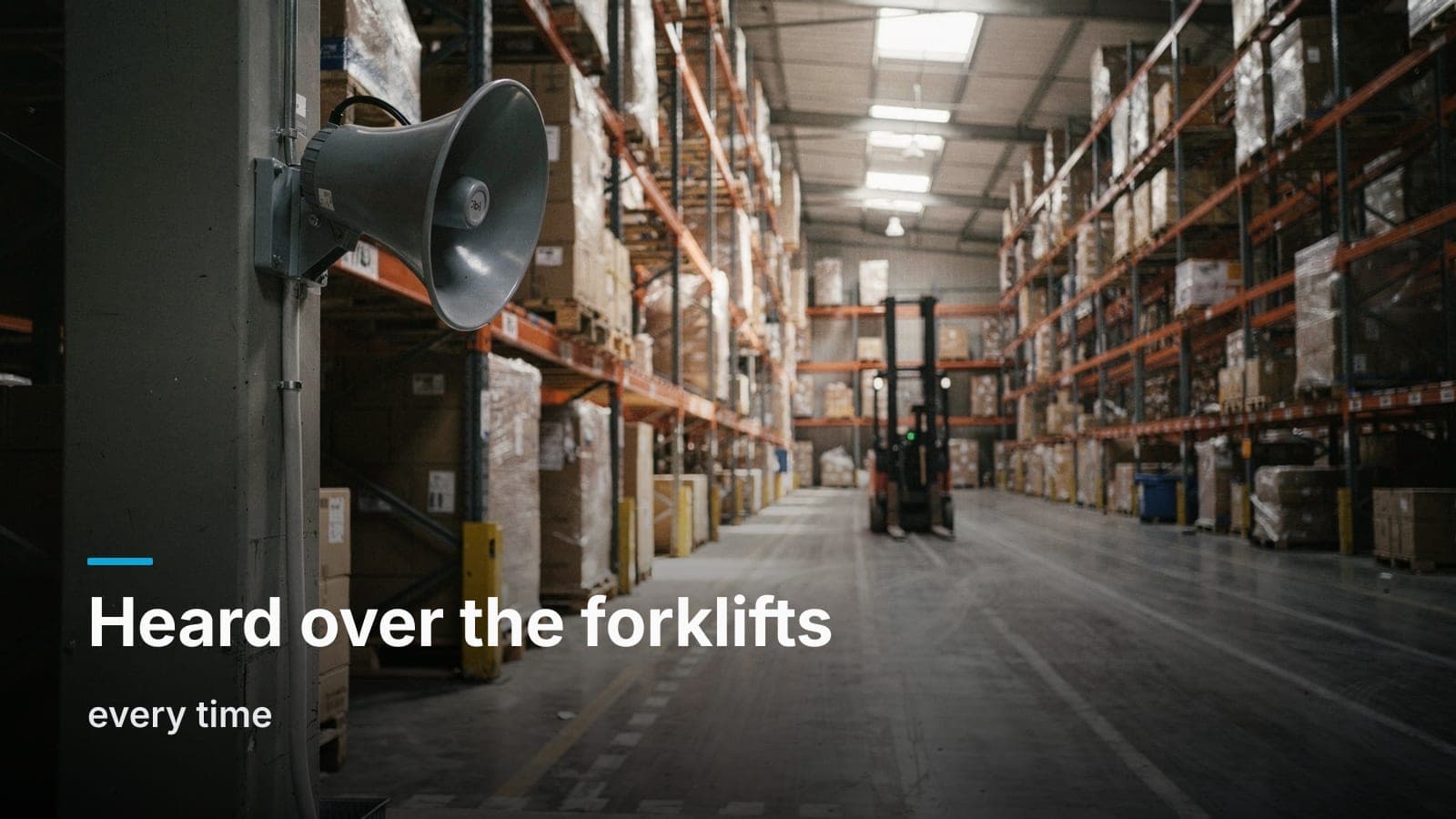
Horn speakers are the gray, trumpet-shaped units you see mounted on columns or high on a wall in distribution centers and plants. They're built to concentrate sound energy in a specific direction over a long throw, and they're far more intelligible over fan noise, forklift traffic, and the general hum of an operating warehouse. They don't sound great — nobody's piping music through a horn for ambiance — but for "attention, all personnel" announcements, intelligibility beats fidelity every time.
Most industrial jobs end up as a mix: horns down the warehouse aisles and loading areas, ceiling speakers in the office, break room, and conference spaces up front. Trying to use one speaker type for the whole building almost always means the office sounds like an airport terminal or the warehouse can't hear anything at all.
Zoning: office, floor, dock, all-call
A paging system is only as useful as its zoning. If "page" means "blast every speaker in the building," you end up with people either ignoring it (false alarm fatigue) or being startled by warehouse-volume horns blaring into a quiet office next door.
Typical zone breakdown on a distribution or manufacturing site:
- Warehouse floor — one or more zones depending on size, usually split by aisle run or department
- Office / front of house — lower-output ceiling speakers, separate volume control
- Dock / exterior — often its own zone since forklift and truck noise out there is constant
- All-call — overrides everything, used for safety announcements, severe weather, or an evacuation
Good zoning means a supervisor can page just the dock for a truck arrival, just the office for a visitor, or hit all-call when it actually matters. It also lets you set volume independently per zone instead of one building-wide level that's either too loud up front or too quiet in back.
Tying it into the phone system
You don't necessarily need a standalone paging system with its own handset. Most VoIP phone systems (and a lot of on-prem PBXs) support paging through an adapter that bridges a phone extension or dial code into a dedicated paging amplifier, which then drives the horns and ceiling speakers across the zones. Anyone with a desk phone can dial the page code for their zone, or punch all-call, without extra hardware at their desk.
The amp and zone paging controller are the pieces that actually do the heavy lifting — they take that audio signal from the phone system and route it to the right speaker zone at the right volume. Sizing that amp correctly (enough wattage per zone, enough zones, correct speaker taps) is where a lot of self-installed systems fall short: the phone system paging feature works fine, it's the amplifier and speaker wiring behind it that was never designed for the building.
Safety announcements aren't optional
In a warehouse or plant, paging isn't just "attention to the break room, there's pizza." It's often the primary way to issue a severe weather warning, an evacuation order, or a floor-wide safety hold when there's an incident on the line. That's a strong argument for all-call capability that overrides zone settings and for making sure horn coverage actually reaches every working area of the floor, not just near the office. If your paging system doubles as your safety notification system, it's worth treating speaker placement with the same seriousness you'd apply to smoke detector coverage.
Sizing it by square footage and noise, not guesswork
The honest answer to "how many speakers do I need" is: it depends on ceiling height, ambient noise level, and layout, and it should come from a walk-through, not a square-footage rule of thumb pulled off a spec sheet. That said, the factors that actually drive the design are:
- Ceiling height — higher ceilings need more output and more deliberate aiming, since sound disperses over distance
- Ambient noise — a warehouse running conveyor lines, HVAC units, and forklifts all day needs more horn output and tighter spacing than a quiet storage building
- Racking and obstructions — tall pallet racking blocks and reflects sound, which is why horns usually get mounted on columns down the aisle rather than just on the perimeter walls
- Zone count — more zones means more amp channels and more wiring runs, which affects both equipment cost and labor
A site walk lets us measure actual ambient noise, look at where the racking and columns sit, and map horn placement down the aisles instead of guessing from a floor plan. That's the same reason we start every job — cameras, cabling, access control, AV — with a walk and a fixed quote rather than a number pulled out of thin air.
What it pairs with
Paging rarely gets installed in isolation on an industrial job. It usually shares a rack, a conduit run, or at least a service visit with:
- Dock door buzzers — a driver or receiving crew hits a button at the dock door to alert the warehouse floor, which is really just a specialized paging trigger
- Intercoms — a call box at a gate or dock lets outside visitors reach the office without someone walking out to the fence line, similar in concept to the video intercoms we install at commercial front entrances
- Access control — if the dock or office door already has electric locking hardware, it's efficient to run that wiring and the paging wiring in the same pass
If you're already pulling cable for cameras or network drops in the warehouse, paging conduit and speaker wire is cheap to add to that same rough-in — our structured cabling crews do this constantly on new builds, since running it later means fishing wire through finished walls and up to 28-foot ceilings on a lift.
Frequently asked questions
Can we add paging to an existing warehouse without a phone system upgrade?
Usually yes. A paging adapter typically plugs into existing analog or VoIP phone trunks without requiring a new phone system, though the exact compatibility depends on your current PBX or VoIP provider — worth confirming with whoever manages your phone system before quoting hardware.
How loud does a warehouse horn speaker get?
Horn speakers are rated in output and dispersion pattern rather than a simple volume number, and the right model depends on ceiling height, distance to be covered, and ambient noise — which is exactly why a walk-through beats picking a speaker off a spec sheet.
Does paging interfere with our Wi-Fi or network cameras?
No. Paging runs on its own low-voltage wiring to a dedicated amplifier, separate from your data network, though the amp itself may sit in the same rack as your network switches for convenience.
Can one system page multiple buildings on the same site?
Yes, if the buildings are already connected by fiber or a wireless bridge for data, paging can often ride that same backbone — otherwise it typically needs its own trunk or a networked paging controller at each building.
Do we need a dedicated handset or can anyone page from their desk phone?
Most systems let any extension dial a paging code for their zone, no special handset required, though a lot of warehouses still keep one wall-mounted paging station near the dock or office for quick access.
If your warehouse page keeps getting lost in the noise, get in touch and we'll walk the floor with you and put together a fixed quote.